Session 5 2025-26 Production Project

SUMMARY

Role

  • Place your MAIN ROLE TITLE for the production here…

Intention (SMART Goal) for the Session

  • Copy and paste your SMART Goal from the class PTS, Project Tracking Sheet, here…

PRODUCTION

THE (FILM, SOUND, or GAME)

Link the final version of the film, game, or song from your Google Drive (FILM & ROCK) or itch.io (GAME). Make sure it is publicly viewable.

Write a descriptive sentence (ya’know, give me some unique details) about the embedded or linked project above.

SKILLS COMMENTARY

Link the team slideshow with your role, SMART Goal, and evidence of your SMART Goal for this session.

Write a sentence about your role in the slideshow and MAIN creative and technical contributions to the project. (Think of it this way – state what impact you made, and if you didn’t do your job, the project would not have succeeded or been as good – show off a little)

POST-PRODUCTION

21st CENTURY SKILLS BEST PRACTICES

Write  SPECIFIC examples of HOW you demonstrated the skills below…

Ways of Thinking (Creativity, Innovation, Critical Thinking, Problem Solving)

How did you GROW in expressing your creativity, innovation, critical thinking, and or problem-solving during this project? Pick one and EXPLAIN.

Ways of Working (Communication & Collaboration)

How did you GROW as a communicator and collaborator during this project? Pick one and EXPLAIN.

Tools for Working (Info & Media Literacy)

How did you GROW in any of the industry technology tools (game engine, DAW, camera, video editor, etc. ) you used during this project? Pick one and EXPLAIN.

Ways of Living in the World (Life & Career)

How did you GROW in preparation for life or for a career during this project? Pick one and EXPLAIN.

REACTIONS TO THE FINAL VERSION

Place at least one comment from the PEER review and cite only the student’s first name.

Place at least one comment from the ADVISOR review and cite the advisor’s name.

SELF-REFLECTION

Pick one of these types of reflection: action points, evaluative, intentional, or retrospective, state which one you picked, and write your reflection here…

GRAMMAR AND SPELLING

Place the name of the grammar and spelling tool you used to create this blog post.

EDITOR

Name the person who reviewed your blog post for grammar and spelling issues. First name only.

DID YOU DELETE ALL OF MR. LE DUC’s INSTRUCTIONS ABOVE? <— DELETE THIS INSTRUCTION, TOO!
NAME OF PROJECT Postmortem Document TEMPLATE for FILM

This document reviews the film production project. Its purpose is to facilitate collective learning by analyzing the pre-production, production, and post-production processes, celebrating successes, and identifying key areas for improvement in future projects.

Field Detail
Project Title: [Insert Film Title Here]
Production Team: [List All Team Members]
Production Duration: [e.g., 4 weeks pre-pro, 3 days shooting, 2 weeks post-pro]
Equipment/Software Used: [e.g., DSLR Camera, DaVinci Resolve, Boom Mic]
Date Completed: [Date]

I. Team and Production Analysis

This section examines the structure, communication, and performance of the production team, with a focus on the five core roles.

A. Roles and Responsibilities

Team Member Primary Role Key Responsibilities and Deliverables
[Name] Director [e.g., Final creative vision, Actor performance, Master shot list]
[Name] Screenwriter [e.g., Final script, Dialogue clarity, Scene structure/pacing]
[Name] Cinematographer [e.g., Lighting design, Camera movement, Frame composition]
[Name] Sound Designer [e.g., Location sound recording, Sound effects (Foley), Mix balance]
[Name] Editor [e.g., Assembly cut, Pacing/Rhythm, Color correction/grading]

B. Collaboration and Handoff Effectiveness

Reflect on how the team worked together across the entire production cycle.

Communication: 

How did the Director communicate the vision to the Cinematographer and Screenwriter? 


What tools (e.g., group chat, storyboards) were used? 


What communication style worked well, and what was missing during intense production moments?


Pre-Production Handoff (Script to Shoot): 

How smoothly did the final script translate into the shot list and storyboards?


Did the Cinematographer feel they had enough time and detail from the Screenwriter and Director to prepare?


Production Handoff (Set to Post-Production): 

How organized were the camera files (dailies) and sound files when they were given to the Editor and Sound Designer? 


Highlight any issues with missing metadata (e.g., scene numbers, good takes).


C. Individual/Team Lessons Learned

Identify specific, actionable takeaways about the process of filmmaking.


Scheduling & Time Estimation (Production): 

Which scenes or setups took significantly longer than expected (e.g., complex lighting, actor blocking)? 


Which took less time? 


What changes should the team make to its shooting schedule next time? (e.g., “We must double the estimate for all close-up setups.”)


Skills Development:

What new technical skills did individuals learn (e.g., pulling focus, complex three-point lighting, advanced editing shortcuts)?


General Takeaways: 

What advice would you give a new film crew starting this project? (e.g., “Always have extra batteries,” “Do a full sound check before every take.”)


II. Film Analysis & Review

This section reviews the final product against the initial design vision, broken down by department.

A. Project Goals vs. Final Outcome

List the major goals set at the beginning of the project and assess their completion status.

Goal (e.g., 3-minute run time, use of dolly shot, single location) Status (Achieved/Partial/Failed) Rationale/Explanation
Overall Assessment of Scope: [Was the initial scope too ambitious, too simple, or just right? What percentage of the initial vision (script/shot list) was completed in the final cut?]

B. What Went Right (Successes)

Identify the most successful elements of the project—the things that should be repeated in the future.

Role Success Element Why it Worked
Screenwriter [e.g., The dialogue felt natural; the plot twist was effective.] [e.g., We read the lines out loud before finalizing; the outline was strong.]
Cinematographer [e.g., The low-key lighting in the climax was powerful; the handheld camera felt motivated.] [e.g., Excellent gaffer support; practiced the camera movement several times.]
Director [e.g., The actor performances were convincing; the emotional tone was consistent.] [e.g., Thorough rehearsal process; the Director had a clear, single vision.]
Sound Designer [e.g., The location audio was clean; the music transitions were seamless.] [e.g., Used professional external recorder; paid close attention to room tone.]
Editor [e.g., The film’s overall pace felt tight; the color grade matched the mood.] [e.g., Good shot coverage allowed for choices; set up the project folder cleanly.]

C. What Went Wrong (Challenges)

Analyze the major problems and roadblocks encountered during development.

Screenplay Issues: 

Did any scene not work on set because the dialogue was too long or the location was impractical as written? 


Explain the necessary on-set rewrite or cuts.


Cinematography/Technical Issues:

Describe the hardest technical problem (e.g., light flicker, focus hunting, bad white balance).


Why was it difficult to solve? How did it impact the final look?


Sound Design Issues (Production & Post): 

Describe the single biggest sound problem (e.g., traffic noise ruined a take, microphone placement was visible, final mix felt empty).


How much time was lost fixing it in post-production?


Editing/Post-Production Flow: 

Did poor organization of footage or sound assets cause delays? 


Did the Director or Screenwriter change their mind late in the process, requiring extensive re-editing? 


Explain the impact.


III. Key Takeaways and Future Best Practices

Provide actionable advice for the next film project, focusing on the best practices learned.

Focus Area Future Best Practice (Specific Actionable Advice)
Screenwriter [e.g., “Write with specific locations in mind,” “Never exceed 25 words of dialogue per shot.”]
Director [e.g., “Always get two different takes for every scene—one fast, one slow,” “Block actors before setting any lights.”]
Cinematographer [e.g., “Take a reference photo of the lighting setup before striking a set,” “Use an exposure meter for every key light.”]
Sound Designer [e.g., “Always record 30 seconds of clean room tone for every location,” “Monitor audio with headphones at all times during takes.”]
Editor [e.g., “Never start the assembly cut until all dailies are correctly labeled and organized,” “Get feedback on the first 1-minute cut within 48 hours.”]


NAME OF PROJECT Postmortem Document TEMPLATE for ROCK

This document is a formal review of our recent performance project. Its purpose is to facilitate collective learning by analyzing the process, celebrating successes, and identifying key areas for improvement in future performances.

  • Project Title: [Insert Song Title Here] 
  • Band/Group Name: [e.g., The Tantrums, Band 2, etc.] 
  • Project Duration: [e.g., 3 weeks] 
  • Performance Date: [Date]

I. Band Analysis and Collaboration

This section analyzes the structure, communication, and performance of the band.

Roles and Responsibilities

Team Member Primary Role Key Responsibilities
[Name] Drums Setting the tempo, maintaining feel, and arranging rhythmic hits.
[Name] Bass Locking in with the drummer, creating melodic foundation/grooves.
[Name] Guitar Rhythm/Lead parts, tone shaping (pedals/amp settings).
[Name] Keyboards Harmony/Pad textures, specific solo or hook parts.
[Name] Vocals Melody execution, stage presence, clear lyrical delivery.

Collaboration Effectiveness

Reflect on how the team worked together across the project timeline.

Communication: 

How often did the band communicate about the song parts outside of class? 


What tools (e.g., shared sheet music, recordings, chat) were used? 


What worked well (e.g., clear section leaders), and what was missing (e.g., not enough feedback on volume balance)?


Conflict Resolution (Creative Differences): 

Describe any disagreements or creative differences that arose (e.g., tempo choice, solo section, instrumental arrangement). 


How were they resolved, and was the final process effective for everyone?


Task Integration (Arrangement Flow):

How smoothly did the individual parts fit together during rehearsal? 


What challenges arose when one person’s part depended on another’s (e.g., the guitarist needed the bassist to change their rhythm)? 


Highlight any issues with learning parts before rehearsals.

Individual/Team Lessons Learned

Identify specific, actionable takeaways about the rehearsal process.

Time Estimation & Rehearsal Efficiency: 

Which parts of the song (e.g., the bridge, the drum solo, the vocal harmony) took significantly longer to perfect than expected? 


What changes should the band make to its warm-ups or time management next time? (e.g., “We must spend the first 15 minutes checking everyone’s tone/levels.”)


Skills Development: 

What new musical skills did individuals learn (e.g., advanced strumming pattern, better microphone technique, using a new keyboard patch)?


General Takeaways: 

What advice would you give a new band starting this project? (e.g., “Define the instrumental dynamics first,” “Record yourself every practice.”)

II. Performance Analysis & Review

This section reviews the final performance against the initial musical goals.

Project Goals vs. Final Outcome

List the major goals set at the beginning of the project and assess their completion.

Goal (e.g., Maintain consistent tempo, Execute the Guitar Solo perfectly, Nail the dynamics) Status (Achieved/Partial/Failed) Explanation


Overall Assessment of Arrangement Scope: [Was the song too complex for the time we had? What percentage of the initial vision (e.g., adding backup vocals, creating an outro) was completed?]

What Went Right (Successes)

Identify the most successful elements of the performance—the things that should be repeated in the future.

Core Musicality / Feel: 

What specific section (e.g., the second verse, the final chorus) felt the most tight, energetic, or musically solid? 


Why did it work? (e.g., The drummer and bassist were perfectly “locked in.”)


Tone, Dynamics, or Stage Presence: 

Which visual or auditory elements looked/sounded professional (e.g., the guitarist’s clean tone, the lead vocalist’s confidence, the band’s use of dynamics)? 


Why was this area successful?


Specific Technical Achievements: 

Did the band successfully execute a complex musical passage or fix a major mid-performance mistake seamlessly? 


Describe it briefly.

What Went Wrong (Challenges)

Analyze the major problems and roadblocks encountered during the rehearsal and performance.

Scope Creep or Arrangement Flaws: 

Did the song arrangement get too complex? 


Did a core musical idea not work out once we played it live? 


Explain the impact (e.g., it felt rushed, it confused the audience) and what content was cut or simplified.


Technical Issues (Gear/Sound): 

Describe the single hardest gear issue or sound problem (e.g., microphone feedback, a specific patch stopped working, unable to hear the click track). 


How much time was lost fixing it?


Part Consistency Issues: 

Did missing or poorly organized parts cause confusion or errors during the live performance (e.g., the backing vocalist forgot the entrance, the guitarist misread the chart)?

Key Design Takeaways

Provide advice for the next band project, based on what went well.

Focus Area Future Best Practice (Specific Actionable Advice)
Arrangement [e.g., “Always define the tempo and dynamics before writing individual parts,”]
Rehearsal [e.g., “Use a metronome for all rehearsals,” ]
Performance/Gear [e.g., “Always check instrument levels with the soundboard operator before the show,”]


My GTD Trusted System: NAME THE SYSTEM – TEMPLATE

  • TITLE THIS BLOG POST: My GTD Trusted System: NAME THE SYSTEM
    • EXAMPLE: My GTD Trusted System: Google Tasks and Calendar
  • PLACE A CREATIVE COMMONS IMAGE RELATED TO YOUR TRUSTED SYSTEM, MAYBE THE LOGO?
  • FOLLOW THE DIRECTIONS IN THE POST BELOW:
    • Answer the questions
    • Publish post
  • REVIEW THIS POST EXAMPLE:
    • Coming soon!
  • DELETE ALL OF MR. LE DUC’s INSTRUCTIONS, AFTER COMPLETING EACH SECTION

Notes from Learning about the Brain and GTD

PLACE NOTES FROM WHAT YOU LEARNED ABOUT DAVID ALLEN’S GETTING THINGS DONE BOOK, JAMES CLEAR’S ATOMIC HABITS BOOK, AND RESEARCH ABOUT THE BRAIN’S ABILITY TO FOCUS ON ONE TASK AT A TIME AND THE INEFFICIENCY OF MULTITASKING

DELETE ALL OF MR. LE DUC’s INSTRUCTIONS ABOVE

My GTD Trusted System Screenshot

INCLUDE A SCREENSHOT OF YOUR TRUSTED SYSTEM TOOL

SELECT these keys on your computer keyboard to take a screenshot:

COMMON + SHIFT + 4, then drag your mouse over the area you want to take a screenshot. When you let go, the picture will appear on your desktop.

DELETE ALL OF MR. LE DUC’s INSTRUCTIONS ABOVE

Five GTD Steps for Your Trusted System

WRITE AT LEAST ONE SENTENCE FOR EACH OF THE FIVE STEPS BELOW, CLEARLY DESCRIBING HOW YOUR SYSTEM HELPS YOU DO EACH ONE OF THESE STEPS…

Collects


Processes


Organizes


Keeps Track & Adjusts


Completes


DELETE ALL OF MR. LE DUC’s INSTRUCTIONS ABOVE

Session 5 Week 7 Production Weekly Work Log

FOLLOW THESE DIRECTIONS – THEN DELETE THEM!

  • REMINDER: This assignment cannot be made up, as it assesses punctuality, or being on time, and regular, detailed documentation, which is essential in the world of work
  • Title the post properly: Session # Week # Production Weekly Work Log
  • Publish the post right away; this starts the autosave feature
  • On Monday, write your clear, specific, MEASURABLE, realistic goal related to  a BEST PRACTICE and your main PRODUCTION ROLE, which includes specific technical and creative best practice elements, not workflow elements, like ‘finish the to-do list’:
  • On Friday, copy and paste your whole post into Grammarly’s online system to check grammar
  • Watch Mr. Le Duc’s Grammarly and Edublogs video tutorial
  • REVIEW THESE POST EXAMPLES:
    • Coming soon…
Session Number: 5
Week Number: 7
Week Goal: (a clear, specific,
MEASURABLE,
realistic goal
related to a BEST PRACTICE
and to your main PRODUCTION ROLE)
Write goal here…

Weekly Work Summary

Tasks Completed This Week:

Explain the work you completed…

Best Practice(s) Demonstrated:

Name the best practice(s) from the BEST PRACTICES list. Describe specifically how you demonstrated each one.

Summarize the work you completed this week in relation to your goal. Describe the best practices you demonstrated, and explain how your choices reflected those practices. Be specific about what you made, built, recorded, edited, or designed.

DELETE MR. LE DUC’S INSTRUCTIONS AFTER COMPLETING THEM

Personal Reflection on the Week

Did you achieve your weekly goal?

Your answer goes here…

What was the biggest issue or problem you faced this week?

Your answer goes here…

How did you overcome this issue or problem?

Your answer goes here…

Remember, reflecting on your work sharpens problem-solving skills and deepens understanding by encouraging thoughtful review, which boosts retention and streamlines your workflow for a stronger, more focused week ahead.

DELETE MR. LE DUC’S INSTRUCTIONS AFTER COMPLETING THEM

Evidence of Weekly Goal

Whether you achieved your weekly goal or not, place evidence here of what was accomplished FOR YOUR ROLE. Embed evidence, or link to a publicly shared file in your Google Drive. This evidence can be a screenshot, an audio file, a video clip, a picture of paperwork, etc.

Write at least one sentence explaining your evidence.

DELETE MR. LE DUC’S INSTRUCTIONS AFTER COMPLETING THEM

Most Proud of…

Explain in complete sentences what you are most proud of after completing this week’s work. BE SPECIFIC.

DELETE MR. LE DUC’S INSTRUCTIONS AFTER COMPLETING THEM

Rubric

Weekly Work Log Journal Blog Post Rubric

School of Rock – Week 11 – Updating Workflow – Mind Like Water

COPY AND PASTE ALL THE CONTENT BELOW

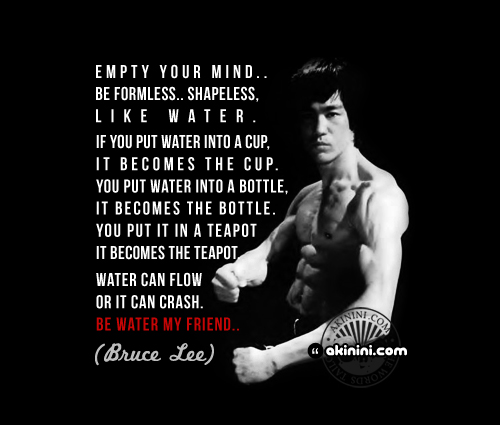
“‘Be shapeless and formless.. like water’ (Bruce Lee)” by Akinini.com is licensed under CC BY-NC-ND 2.0

“Have a mind like water.”

― David Allen,  GTD

SUMMARY

  • Write your weekly summary here, last, at the end of the week…
    • Only one to two sentences of WHAT YOU DID
  • DELETE ALL OF MR. LE DUC’s INSTRUCTIONS, AFTER YOU ARE DONE

PRACTICE ROOM (GUITAR LESSONS)

  • Set a timer
  • Spend up to 30 minutes in the ‘room’
  • Write a reflection of the key topics that got your attention.
  • Write how far did you got in lessons this week
  • DELETE ALL OF MR. LE DUC’s INSTRUCTIONS, AFTER YOU ARE DONE
Screenshot from Mary Spender’s YouTube Channel

Watch Mary Spender: Powerful advice from 10 Professional Musicians you need to hear (14:15)

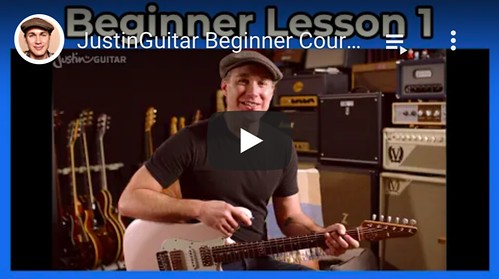
Screenshot from JustinGuitar.com
  • Screenshot from JustinGuitar.comBe curious about Justin.
  • Mr. Le Duc considers him the best beginning guitar teacher online. He’s not the only one that thinks this.  Check out some of the celebrity endorsements at justinguitar.com.

How interested in learning more about playing the guitar?

    • 1 (YUCK!)
    • 2 (not really)
    • 3 (sorta interested)
    • 4 (interested)
    • 5 (YES!)

Your score: ?

CLASSROOM (THEORY & ANALYSIS)

  • Set a timer
  • Spend up to 15 minutes in the ‘room’
  • Pick a video essay from Holistic Songwriting’s Artist Series and watch it.
  • Write a reflection of the key topics that got your attention.
  • DELETE ALL OF MR. LE DUC’s INSTRUCTIONS, AFTER YOU ARE DONE

Holistic Songwriting by Friedemann Findeisen

Screenshot from Holistic Songwriting’s Channel at YouTube

An Example: The Swift Formula – One Note Melodies

From Holistic Songwriting’s How Taylor Swift Writes Melodies at YouTube

How interested in learning more about music theory and song analysis?

    • 1 (YUCK!)
    • 2 (not really)
    • 3 (sorta interested)
    • 4 (interested)
    • 5 (YES!)

Your score: ?

LAB (THEORY PRACTICED)

  • Set a timer
  • Spend 15 minutes in this ‘room’
  • Write a reflection of the key topics that got your attention.
  • DELETE ALL OF MR. LE DUC’s INSTRUCTIONS, AFTER YOU ARE DONE
Screenshot of Lyrics Melody and Chord Progressions from HookTab at YouTube

Explore the tutorials (but you do not need to watch all of them – just pick what looks interesting to you) from the:

How interested in learning more about HookLab and HookTab?

    • 1 (YUCK!)
    • 2 (not really)
    • 3 (sorta interested)
    • 4 (interested)
    • 5 (YES!)

Your score: ?

OUTSIDE (PRODUCTIVITY & THE BRAIN)

  • Set a timer
  • Spend 15 minutes in this ‘room’

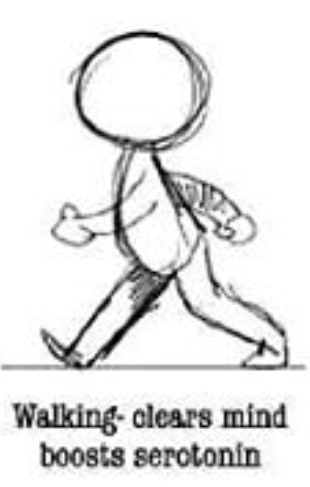
  • Go for a 10-minute walk, if it is safe to do so 
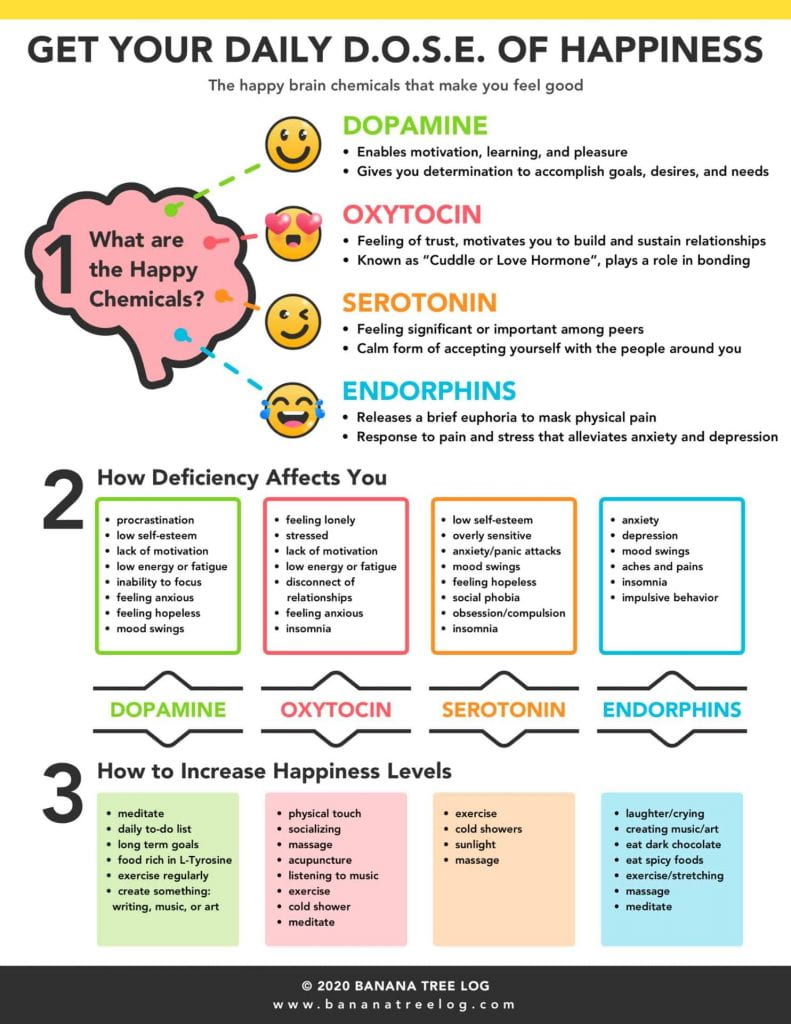
    • Reflect on how you structure your day to maximize your production of the  D.O.S.E. happiness brain chemicals
  • Writing a small paragraph reflection for 10 minutes
  • DELETE ALL OF MR. LE DUC’s INSTRUCTIONS, AFTER YOU ARE DONE

How interested in learning more about music theory and song analysis?

    • 1 (YUCK!)
    • 2 (not really)
    • 3 (sorta interested)
    • 4 (interested)
    • 5 (YES!)

Your score: ?

STUDIO (SONGWRITING)

  • Set a timer
  • Spend up to 15 minutes
  • Write a reflection of the key topics that got your attention.
  • DELETE ALL OF MR. LE DUC’s INSTRUCTIONS, AFTER YOU ARE DONE
Screenshot from Holistic Songwriting at YouTube

Watch Holistic Songwriting: Do THIS with every song you write | Hit Song Architect S1E3

How interested in songwriting, song structure, and music production?

    • 1 (YUCK!)
    • 2 (not really)
    • 3 (sorta interested)
    • 4 (interested)
    • 5 (YES!)

Your score: ?

CONTROL ROOM (RECORDING & MIXING)

  • Set a timer
  • Spend 15 minutes in this ‘room’
  • DELETE ALL OF MR. LE DUC’s INSTRUCTIONS, AFTER YOU ARE DONE
Soundtrap mixing and publishing at Clark Eagling’s YouTube Channel

Watch Clark Eagling: Soundtrap tutorial 5 – Arranging the song, Mixing and adding effects

Watch all five videos in the playlist, if you are interested.

How interested in recording, engineering (sound effects, EQ), and mixing?

    • 1 (YUCK!)
    • 2 (not really)
    • 3 (sorta interested)
    • 4 (interested)
    • 5 (YES!)

Your score: ?

WHAT I LEARNED and PROBLEMS I SOLVED

  • Write only a few sentences of WHAT YOU LEARNED
  • In one or two sentences, describe a PROBLEM YOU SOLVED
  • DELETE ALL OF MR. LE DUC’s INSTRUCTIONS, AFTER YOU ARE DONE

WEEKLY ACTIVITY EVALUATION

  • Give feedback on this week’s class Content and Process
  • DELETE THIS WHOLE SECTION, AFTER YOU ARE DONE

Game Design – Week 11 – Updating Workflow – Mind Like Water

COPY AND PASTE ALL THE CONTENT BELOW

“‘Be shapeless and formless.. like water’ (Bruce Lee)” by Akinini.com is licensed under CC BY-NC-ND 2.0

“Have a mind like water.”

― David Allen,  GTD

SUMMARY

  • Write your weekly summary here, last, at the end of the week…
    • Only one to two sentences of WHAT YOU DID
  • DELETE ALL OF MR. LE DUC’s INSTRUCTIONS, AFTER YOU ARE DONE

PRACTICE ROOM (TUTORIALS)

  • Set a timer for 30 minutes in this ‘room’
    • Continue with either ONE of the scripting languages below, Javascript (Construct 3 / PlayCanvas) or C# (Unity)  (NOT BOTH)

Construct 3 / PlayCanvas – Javascript

Unity – C#

CLASSROOM (THEORY & ANALYSIS)

Screenshot from Construct.net
  • Set a timer
  • Spend 15 minutes in this ‘room’
  • Read Why Use Construct?
  • Explore some games made with Construct 3 at The Showcase Page
  • Read this page: Contruct.net
    • Learn about the basics of Construct 3
  • Write a couple sentence description of what you learned
  • DELETE ALL OF MR. LE DUC’s INSTRUCTIONS, AFTER YOU ARE DONE

LAB (THEORY PRACTICED)

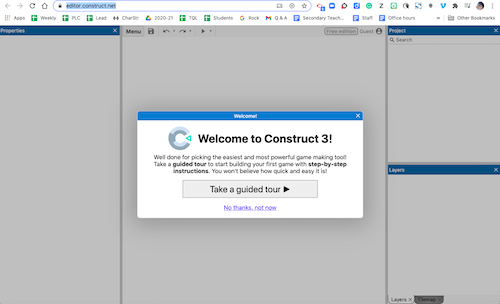
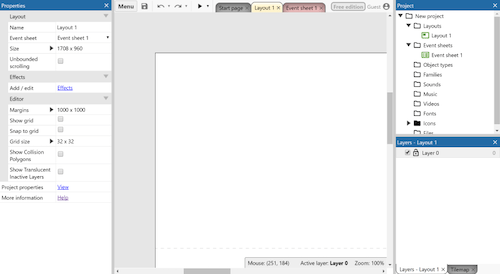
Screenshot from editor.construct.net
  • Set a timer
  • Spend up to 15 minutes
  • Take the guided tour
  • DELETE ALL OF MR. LE DUC’s INSTRUCTIONS, AFTER YOU ARE DONE

OUTSIDE (PRODUCTIVITY & THE BRAIN)

  • Set a timer
  • Spend 30 minutes in this ‘room’

  • Go for a 15-minute walk, if it is safe to do so 
    • Reflect on how you structure your day to maximize your production of the  D.O.S.E. happiness brain chemicals
  • Writing a small paragraph reflection for 10 minutes
  • DELETE ALL OF MR. LE DUC’s INSTRUCTIONS, AFTER YOU ARE DONE

STUDIO (CREATIVITY)

Screenshot from Construct Begginer’s Guide
  • Set a timer
  • Spend up to 45 minutes
  • Make something to share on Thursday (3rd Period) or Friday (4th Period)
  • Write a couple sentence description of what you made
  • DELETE ALL OF MR. LE DUC’s INSTRUCTIONS, AFTER YOU ARE DONE

CONTROL ROOM (PRODUCTION)

  • Set a timer
  • Spend up to 15 minutes in this ‘room’
  • Publish your work from Construct.net to our Schoology Construct 3 Discussion Board
  • DELETE THIS WHOLE SECTION, AFTER YOU ARE DONE

WHAT I LEARNED and PROBLEMS I SOLVED

  • Write only a few sentences of WHAT YOU LEARNED
  • In one or two sentences, describe a PROBLEM YOU SOLVED
  • DELETE ALL OF MR. LE DUC’s INSTRUCTIONS, AFTER YOU ARE DONE

WEEKLY ACTIVITY EVALUATION

  • Give feedback on this week’s class Content and Process
  • DELETE THIS WHOLE SECTION, AFTER YOU ARE DONE

Film – Week 11 – Updating Workflow – Mind Like Water

COPY AND PASTE ALL THE CONTENT BELOW

“‘Be shapeless and formless.. like water’ (Bruce Lee)” by Akinini.com is licensed under CC BY-NC-ND 2.0

“Have a mind like water.”

― David Allen,  GTD

SUMMARY

  • Write your weekly summary here, last, at the end of the week…
    • Only one to two sentences of WHAT YOU DID
  • DELETE ALL OF MR. LE DUC’s INSTRUCTIONS, AFTER YOU ARE DONE

PRACTICE ROOM (TUTORIALS)

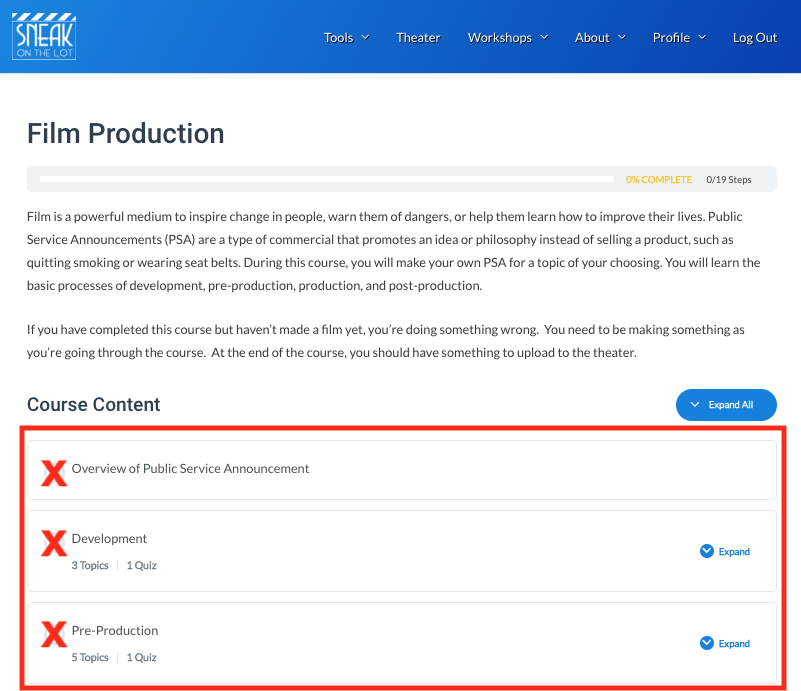
Screenshot from sneakonthelot.com
  • Set a timer for 60 minutes in this ‘room’

CLASSROOM (THEORY & ANALYSIS)

Screenshot from The Story of Film Trailer on NetworkReleasing YouTube channel
  • Set a timer
  • Spend 75 minutes in this ‘room’
  • Watch the first episode of The Story of Film and take notes in a separate blog post

Steps

  1. Create a blog post titled, Story of Film – Episode 1 – Birth of the Cinema
  2. Embed an interesting Creative Commons image from Flickr.com at the top of your post
  3. Create a heading 2 titled Notes 
  4. Watch Mr. Le Duc’s Story of Film Notetaking Video Tutorial (2:00)
  5. Copy and paste the episode’s referenced films as text with links from The Story of Film: An Odyssey at Wikipedia
  6. Cite your source as Wikipedia and link back to The Story of Film: An Odyssey page
    • Example: “The following material is from Wikipedia.”
  7. Take notes as you watch the episode
    • Indent under the film Mark Cousins is referencing
      • Place your notes there
      • These notes will help you on future research projects in high school and possibly in college
  8. Access Episode 1 and begin watching

Examples

  • DELETE THIS WHOLE SECTION, AFTER YOU ARE DONE

OUTSIDE (PRODUCTIVITY & THE BRAIN)

  • Set a timer
  • Spend 15 minutes in this ‘room’

  • Go for a 10-minute walk, if it is safe to do so 
    • Reflect on how you structure your day to maximize your production of the  D.O.S.E. happiness brain chemicals
  • Writing a small paragraph reflection for 10 minutes
  • DELETE ALL OF MR. LE DUC’s INSTRUCTIONS, AFTER YOU ARE DONE

WHAT I LEARNED and PROBLEMS I SOLVED

  • Write only a few sentences of WHAT YOU LEARNED
  • In one or two sentences, describe a PROBLEM YOU SOLVED
  • DELETE ALL OF MR. LE DUC’s INSTRUCTIONS, AFTER YOU ARE DONE

WEEKLY ACTIVITY EVALUATION

  • Give feedback on this week’s class Content and Process
  • DELETE THIS WHOLE SECTION, AFTER YOU ARE DONE

Game Design – Week 10 – GTD – Getting Things Done – Part 2

COPY AND PASTE ALL THE CONTENT BELOW

Image from BiggerPlate.com

Teens are overwhelmed, partly because they don’t yet have the skills to manage the unprecedented amount of stuff that enters their brains each day.  – from LifeHacker.com

“Your mind is for having ideas, not holding them.”

“You can do anything, but not everything.”

― David Allen, (GTD) Getting Things Done for Teens: Take Control of Your Life in a Distracting World

SUMMARY

  • Write your weekly summary here, last, at the end of the week…
    • Only one to two sentences of WHAT YOU DID
  • DELETE ALL OF MR. LE DUC’s INSTRUCTIONS, AFTER YOU ARE DONE

PRACTICE ROOM (TUTORIALS)

  • Set a timer
    • Spend up to 15 minutes in this ‘room’ on either ONE of the scripting languages below, Javascript (PlayCanvas) or C# (Unity)  (NOT BOTH)

PlayCanvas – Javascript

Unity – C#

CLASSROOM (THEORY & ANALYSIS)

Screenshot from Animated Book Summary And Review at YouTube

You are going to learn to develop your own version of David Allen’s Getting Things Done (GTD) process in this ‘room.’

LAB (THEORY PRACTICED)

Screenshot of David Allen TED Talk
Screenshot from Animated Book Summary And Review at YouTube

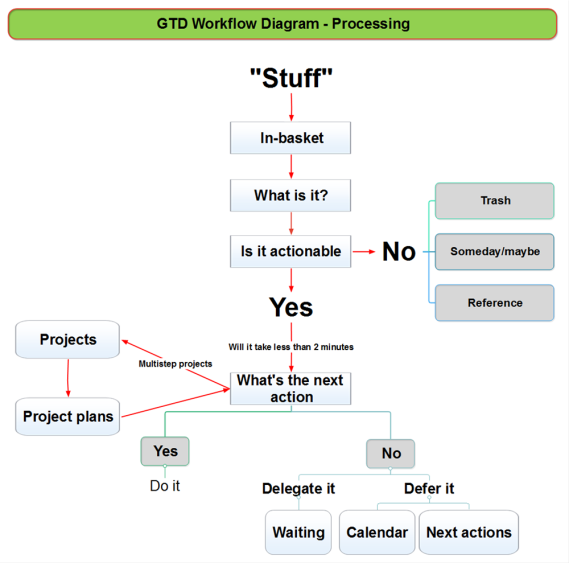
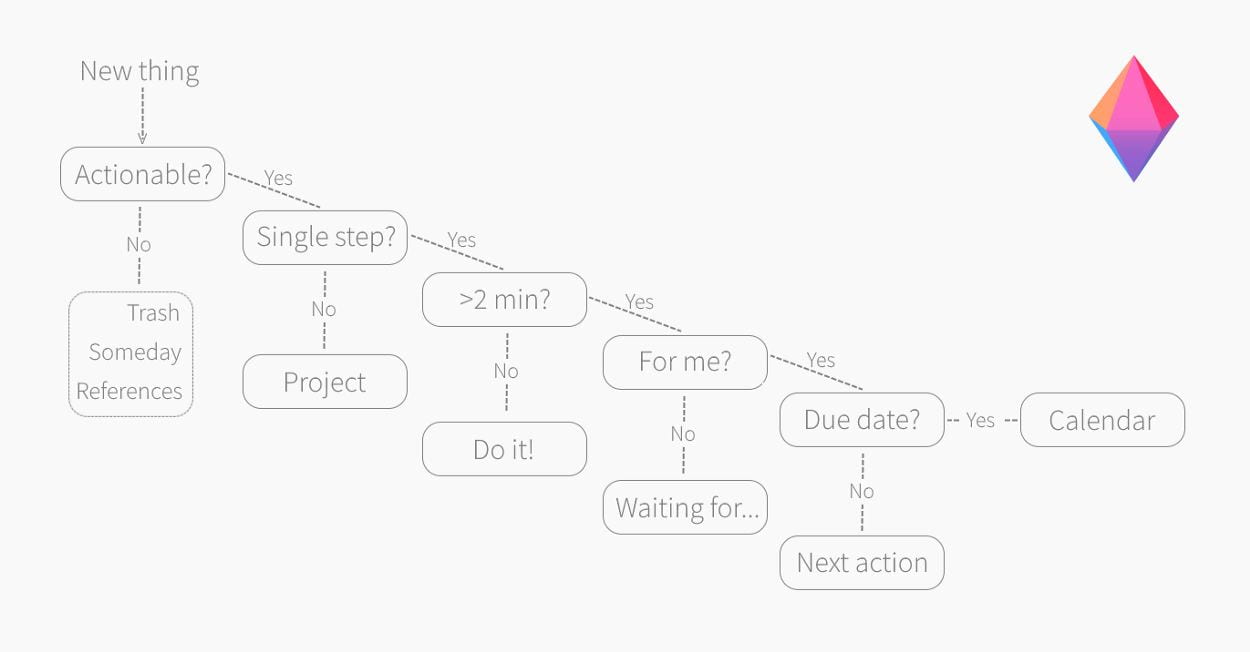
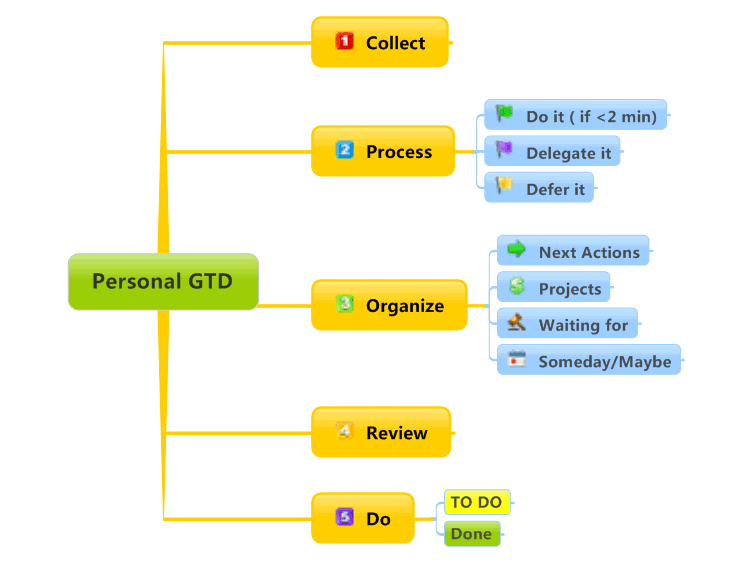
Examine Two GTD Maps: Basic and Detailed

  1. Detailed map by guccio@文房具社 icensed under CC BY-NC 2.0
  2. Basic map from BiggerPlate.com embedded below

GTD-based Trusted System

Image from Trello.com
  • Examine and pick a trusted system from the 4 options listed below to ‘capture’ your work
    • trusted system is your method for managing your tasks in a way that you consistently get things done
    1. Trello.com with a – GTD Template
      • We use Trello in this class to manage group projects
        • You will create a Trello account a few weeks from now regardless
        • You might want to start now
      • We start using Trello in the second semester
      • Watch Mr. Le Duc Creating a Trello Account and Add GTD Template Tutorial (3:45)
      • You can get the free Trello app at the Apple Store or Google Play
    2. Your phone
    3. Paper and pen or pencil
    4. Examine LifeHacker.com’s GTD Resources

OUTSIDE (PRODUCTIVITY & THE BRAIN)

  • Go for a 15-minute walk, if it is safe to do so  and follow the advice from David Allen
    • Bring a notepad
    • Walk and relax and allow your mind to wander
    • If you land on something that needs your attention, write it down
    • Continue throughout your walk
  • DELETE ALL OF MR. LE DUC’s INSTRUCTIONS, AFTER YOU ARE DONE

OPTIONAL EXERCISE

Image from GoodReads.com

STUDIO (CREATING MAPS)

Image from zenkit.com
  • Set a timer
  • Spend up to 15 minutes
  • Then watch David Allen summarize the steps
    • “Very simple folks! …
      1. Just WRITE STUFF DOWN
      2. Decide the ACTIONS and OUTCOMES embedded in them
      3. Get yourself a MAP OF ALL THAT so you can step back and take a look at it.
      4. And then, basically, you USE THE MAP TO DECIDE, “OK, here’s the course that we’re going to go on.”
      5. You then LAUNCH the ‘ship’ on a trusted course in the short term, as well as on the long horizon that you’re moving on.
      6. And then, on a regular basis, you need to REASSESS, “OK, we need to take in NEW DATA, CLEANUP, RECALIBRATE, and REFOCUS for the next leg of the journey.”
    • It’s that simple…”
  • ‘Capture’ all the ACTION ITEMS you can in your GTD Trusted System

CONTROL ROOM (PRODUCTION)

  • Set a timer
  • Spend 10 minutes in this ‘room’
  • Share your system with the class in the Schoology Week 10 Discussion Board
    • Take a picture or screenshot and post on our Schoology page
  • Prepare to briefly share how your system helps you…
    1. Capture Action Items
    2. Process them
    3. and Organize them
  • DELETE THIS WHOLE SECTION, AFTER YOU ARE DONE

WHAT I LEARNED and PROBLEMS I SOLVED

  • Write only a few sentences of WHAT YOU LEARNED
  • In one or two sentences, describe a PROBLEM YOU SOLVED
  • DELETE ALL OF MR. LE DUC’s INSTRUCTIONS, AFTER YOU ARE DONE

WEEKLY ACTIVITY EVALUATION

  • Give feedback on this week’s class Content and Process
  • DELETE THIS WHOLE SECTION, AFTER YOU ARE DONE

Week 9 – GTD – Getting Things Done – Part 1

COPY AND PASTE ALL THE CONTENT BELOW

“Day 092/366 – To Do List” by Great Beyond is licensed under CC BY-NC-SA 2.0

Your toughest work is defining what your work is! –  Peter Drucker

SUMMARY

  • Write your weekly summary here, last, at the end of the week…
    • Only one to two sentences of WHAT YOU DID
  • DELETE ALL OF MR. LE DUC’s INSTRUCTIONS, AFTER YOU ARE DONE

CLASSROOM (THEORY & ANALYSIS)

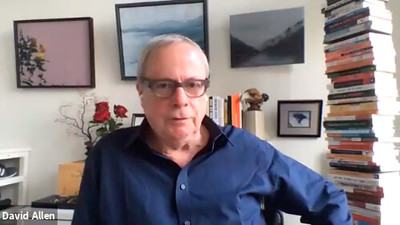
Image of David Allen at TED Talk
Screenshot from David Allen TED Talk

PRACTICE ROOM (TUTORIALS)

In this ‘room’ you are going to try Getting Things Done (GTD).

STEP 1: MAKE A LIST

Screenshot of David Allen TED Talk
  • Set a timer
  • Spend up to 5 minutes
  • Rewatch from 17:21-18:08 of the video
  • Write a list, here in this section of your blog,
    • All the things you need to complete for school
    • All classes, all assignments
  • DELETE ALL OF MR. LE DUC’s INSTRUCTIONS, AFTER YOU ARE DONE

STEP 2: NOTICE WHAT YOU NOTICED

Screenshot of David Allen TED Talk
  • Set a timer
  • Spend up to 5 minutes
  • Rewatch from 18:08-19:55 of the video
  • Prioritize your list, here in this section of your blog
    • Most important at the top
  • DELETE ALL OF MR. LE DUC’s INSTRUCTIONS, AFTER YOU ARE DONE

STEP 3: SET A TIMER

https://giphy.com/gifs/time-clock-konczakowski-d3yxg15kJppJilnW
  1. Set a timer for your first task
    1. Decide how long you think it will take before you start
  2. Start working
  3. Repeat this process for 45 minutes for as many tasks as you can complete, then take a 15-minute break
    • Get up and get a drink of water
    • Get up and go for a walk
    • Every 20 minute blink your eyes 20 times while looking at least 20 feet away
      • This is good for your eyes

Start steps 1 through 3 again, repeat for your school day

OUTSIDE (PRODUCTIVITY & THE BRAIN)

David Allen image
Oct. 2020 Lucidchart interview with David Allen
Image from FastCompany Magazine, https://www.fastcompany.com/3026827/the-brain-hacks-top-founders-use-to-get-the-job-done
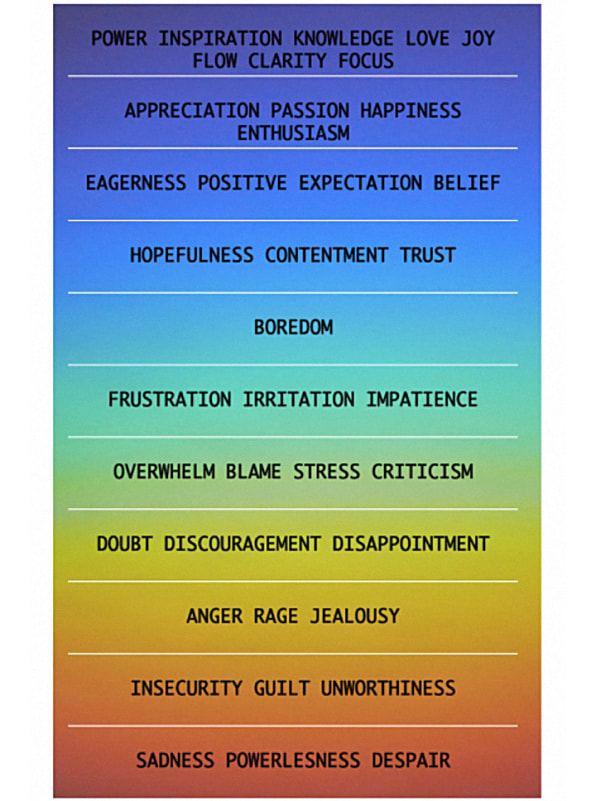
  • Reflect on GTD and getting to the top of the colorful list above for a minute
    • How can the GTD process help you tame the crazy-busy dragon of modern life?

  • Then, go for a 15-minute walk, if it is safe to do so
  • Write a few sentences as a reflection
  • DELETE ALL OF MR. LE DUC’s INSTRUCTIONS, AFTER YOU ARE DONE

OPTIONAL EXERCISE – Read the article and go for another walk 🙂

 Katia Verresen homepage
Katia Verresen, kvaleadership.com

“I coach C-suite executives and rising stars from the earliest startups to Fortune 100 companies. My passion is to help ambitious leaders achieve their full human potential.”  – Read more about Katia…

WHAT I LEARNED and PROBLEMS I SOLVED

  • Write only a few sentences of WHAT YOU LEARNED
  • In one or two sentences, describe a PROBLEM YOU SOLVED
  • DELETE ALL OF MR. LE DUC’s INSTRUCTIONS, AFTER YOU ARE DONE

WEEKLY ACTIVITY EVALUATION

  • Give feedback on this week’s class Content and Process
  • DELETE THIS WHOLE SECTION, AFTER YOU ARE DONE